Filament Media Library: reuse product images.
Chase Miller, Crumbls package developer ·
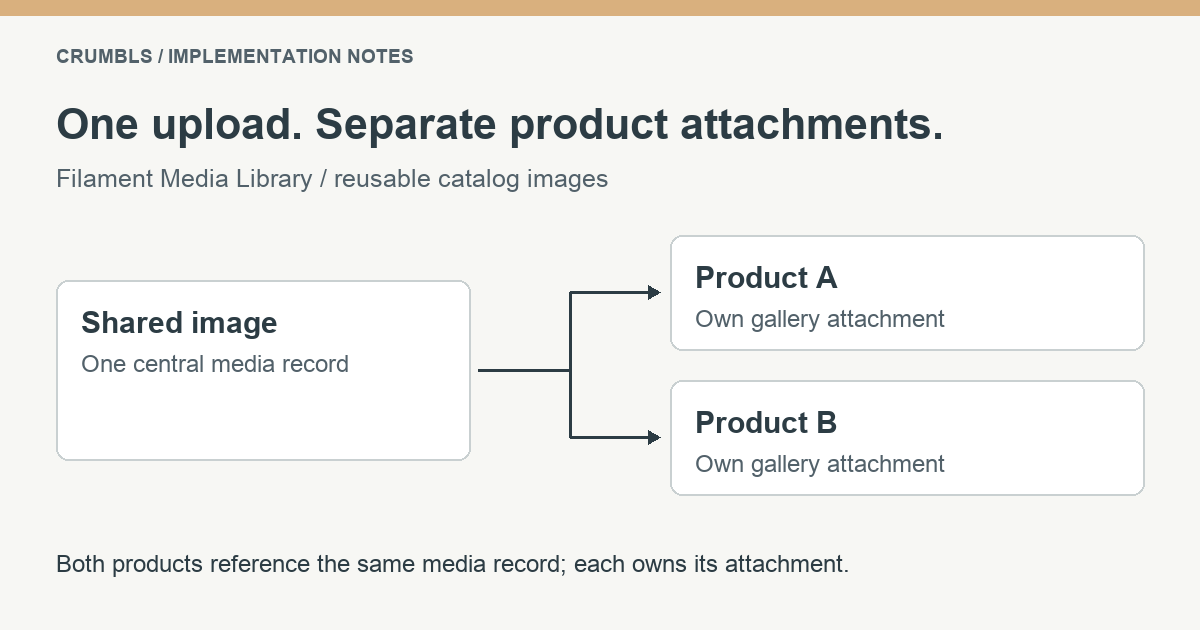
Uploading the same image for every product creates more files without creating more useful information. With Crumbls’ Filament Media Library, upload once and attach the shared media record to the products that need it. This tutorial builds a relationship-backed gallery and shows how to verify that saving one product does not remove another product’s attachments.
The example assumes an existing Laravel 12 or 13 application, PHP 8.3 or later, Filament 5, and an existing Product model and resource. It follows package release 1.3.0. Check your installed release before copying an older README example: the picker’s persistence behavior matters more than the field’s name.
Choose the attachment model first
There are three different concepts here. A product is your business record. A central media record holds metadata such as the title and alternative text. An attachment connects that media record to a product, with a collection name and an order. The physical file is managed through the package’s underlying Spatie Media Library integration.
Suppose two products use the same specification image. They should reference one media record through separate attachments. A collection named gallery groups those references on each product; it does not create a new physical storage disk or a duplicate upload. This distinction is what makes reuse possible.
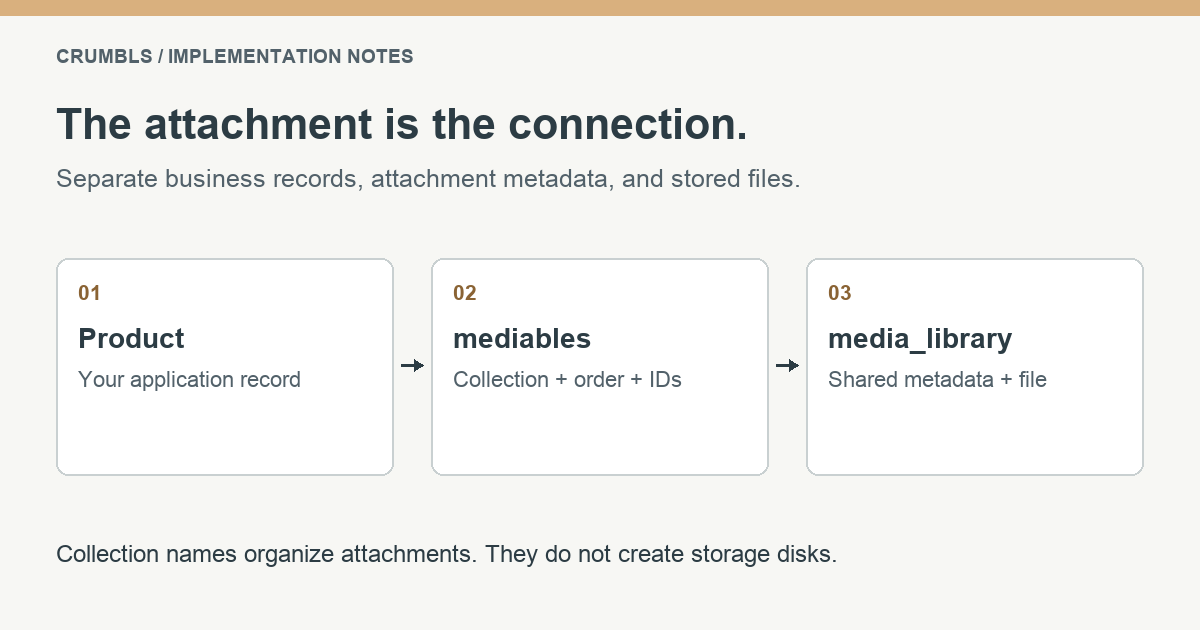
Use a distinct collection for each job. For example, gallery can hold several product photographs while featured holds a primary image. Two fields using the same collection are editing the same attachment set, even if their field names differ. Giving the fields different names alone does not separate their contents.
Install and register Filament Media Library
Start in a development environment with your normal database backup and migration process. Install the package, run the migrations, and register the plugin in the relevant Filament panel provider. Merge this registration into the panel’s existing plugin list instead of replacing other plugins.
composer require crumbls/filament-media-library:^1.3If this application has not already installed Spatie Media Library’s media table and migration, publish that underlying migration first. Check existing migrations before doing this so you do not create a second migration for a table the application already owns.
php artisan vendor:publish --provider="Spatie\MediaLibrary\MediaLibraryServiceProvider" --tag="medialibrary-migrations"Then run the application’s migrations, including the central library and attachment tables supplied by Crumbls:
php artisan migrateuse Crumbls\FilamentMediaLibrary\FilamentMediaLibraryPlugin;
// In the existing panel provider's plugins array:
FilamentMediaLibraryPlugin::make(),Crumbls auto-loads its media_library and mediables migrations; Spatie’s underlying media migration is a separate prerequisite. See Spatie’s installation instructions for the underlying package setup. For this public catalog example, configure the package to use your public filesystem disk and make that disk accessible through your normal deployment process. Local public storage commonly uses php artisan storage:link; an object-storage disk needs its own URL and access configuration.
Upload a small, clearly identified test image through the Media Library page. Give it useful alternative text before attaching it to products. Confirm the stored URL works from the public side of your application, rather than assuming that an admin thumbnail proves the catalog can retrieve the file.
Authorize media management explicitly
The package’s picker endpoints use web authentication and media-library Gates. Being able to sign in is a different permission from managing your shared media. Configure all five abilities before making the integration available, including when the application has customer accounts that cannot enter your Filament panel.
Release 1.3.0 defines its default Gates during package boot. In your existing AppServiceProvider::boot() method, register the application rules in a booted callback so they run afterward. This example expects an application-managed can_manage_media permission; replace the condition with your own authorization system. Ordinary users must not be able to grant themselves that permission.
use App\Models\User;
use Illuminate\Support\Facades\Gate;

// Inside the existing AppServiceProvider::boot() method:
$this->app->booted(static function (): void {
    foreach (['viewAny', 'view', 'create', 'update', 'delete'] as $ability) {
        Gate::define('media-library.'.$ability, function (User $user): bool {
            return (bool) $user->can_manage_media;
        });
    }
});
This simple public-catalog example gives trusted media managers the same permissions across the library. A project that needs separate viewing, uploading, or deletion roles should define those abilities separately. Review the release’s Gate and route registration when integrating with an existing permission system.
Connect the model and the form
Add HasMediaLibrary to the existing product model. Preserve its current traits, relationships, casts, and other behavior. The following reduced example shows the addition; it is not a replacement for your complete model.
namespace App\Models;

use Crumbls\FilamentMediaLibrary\Traits\HasMediaLibrary;
use Illuminate\Database\Eloquent\Model;

class Product extends Model
{
    use HasMediaLibrary;
}
Then add a media picker to the product resource’s existing schema. The multiple picker selects media for the gallery collection. The limit below is an editorial choice for this example; choose a sensible limit for your own interface.
use Crumbls\FilamentMediaLibrary\Forms\Components\MediaPicker;
use Filament\Schemas\Schema;

public static function form(Schema $schema): Schema
{
    return $schema->components([
        // Keep the existing product fields here.
        MediaPicker::make('gallery_selection')
            ->label('Product images')
            ->collection('gallery')
            ->multiple()
            ->maxItems(5),
    ]);
}
In this release, MediaPicker uses dehydrated(false) and a relationship-saving callback. It loads the collection from the record and calls syncMedia() when the form saves relationships. You do not add a gallery_selection database column or make it mass assignable. The model must use the trait, and the form must follow Filament’s normal record and relationship lifecycle.
The underlying MediaPicker implementation is the source for that behavior. If a custom Livewire form bypasses the standard resource save lifecycle, verify its relationship-saving step explicitly. A picker displaying a selection does not prove an attachment has been persisted.
Render the gallery from its collection
Retrieve the product through your application’s normal authorization and visibility rules. In the controller or application layer that prepares the page, load the gallery and its underlying file relation. The view then receives the product and the prepared collection.
$gallery = $product->mediaInCollection('gallery')
    ->with('media')
    ->get();

return view('products.show', compact('product', 'gallery'));
A minimal Blade loop can render only media records that have a file URL. Attribute escaping stays enabled. Use the metadata that describes the image’s role in the page; if different uses need different alternative text, model that editorial requirement rather than treating a shared caption as universally correct.
@foreach ($gallery as $item)
    @if ($item->file_url)
        <img src="{{ $item->file_url }}"
             alt="{{ $item->alt_text ?? '' }}"
             loading="lazy">
    @endif
@endforeach
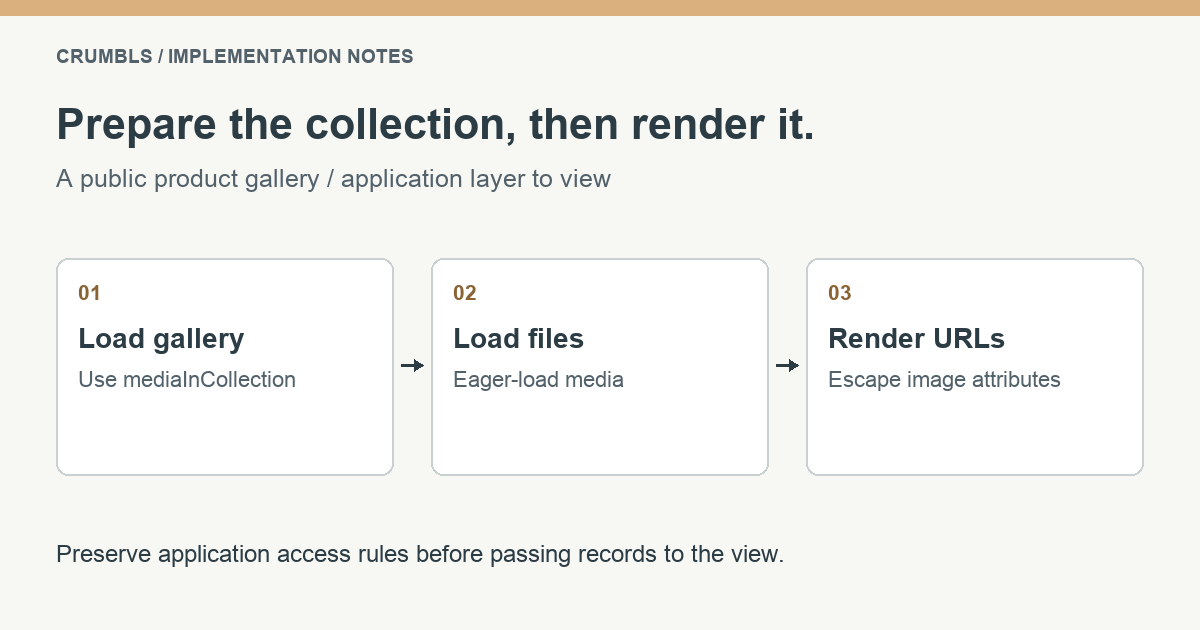
The collection relationship already orders attachments using their pivot order. If you build a product listing, avoid running this retrieval independently inside every card. Plan the relationship loading at the query layer and measure the resulting queries. Similarly, decide which image should load immediately above the fold; lazy loading every image is not automatically the right performance choice.
Verify reuse, saving, and removal
Create two disposable products and attach the same test image to both. Save each product, leave the edit screen, and reopen it. Both should still show the selected image. Then remove the image from the first product’s gallery, save, and confirm that the second product still has its attachment and can render the file.
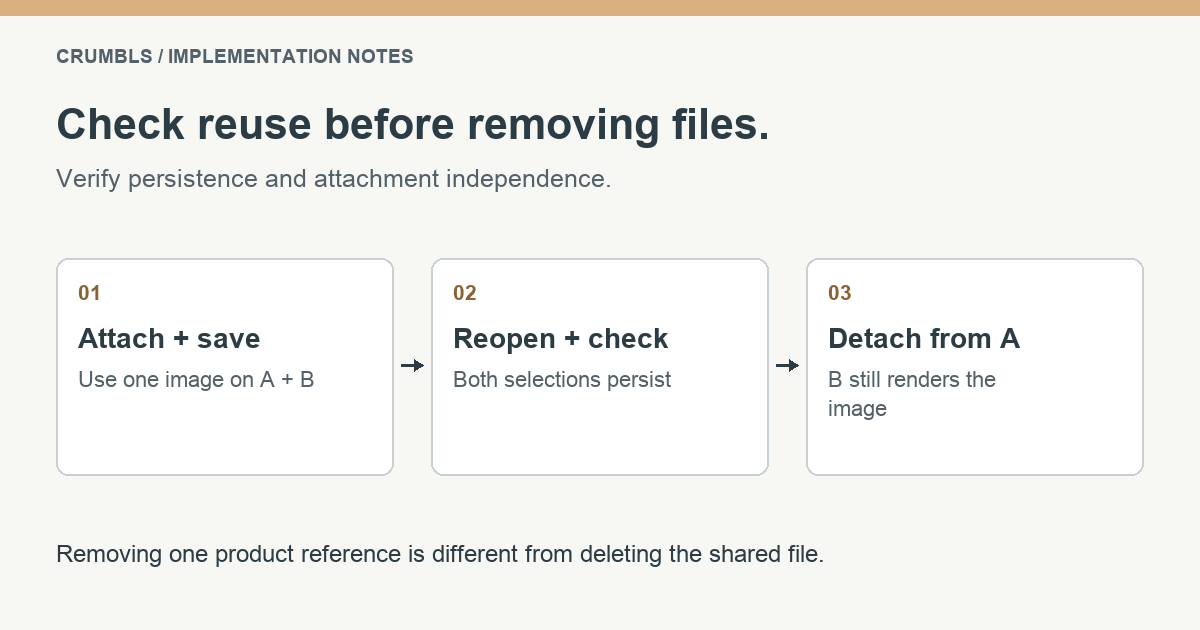
Also test an empty gallery and a missing file. Using an ordinary authenticated account without media permission, verify that direct requests to the picker’s list, show, upload, update, and delete endpoints are denied. Use disposable media for these checks; hiding a panel link does not establish endpoint authorization. Confirm that the intended editor can perform the allowed actions. Treat deleting a central media record as a separate administrative decision because other records may reference it. Do not turn a product’s “remove image” action into a global file deletion without checking those references.
For the API behind these operations, read the release’s attachment trait and the generated package documentation. For application investigation, continue with our Filament Database read-only tutorial. These tutorials live on the main site, separately from documentation regenerated by package releases.
Frequently asked questions
Does the picker need a gallery_ids column?
Not for the relationship-backed implementation shown here. MediaPicker does not dehydrate its state into the product attributes; it saves the named collection through HasMediaLibrary.
Can one image belong to several products?
Yes. Each product has its own attachment records pointing to the same central media record. Detaching one product’s reference does not require deleting that shared record.
Can I use this for private documents?
This example uses a public product catalog. Private files need a separate access and delivery design; a storage URL and an admin panel are not, by themselves, an authorization strategy.
Where to go next
Both examples belong in a working application with clear data ownership and permissions. Read the other tutorial, explore Laravel development at Crumbls, or see how we approach existing PHP applications.
If the integration is part of a larger workflow, tell us what your application needs to do. A specific example is the most useful place to start.